Retrieving Payment Methods
A payment method is an entity that contains all the necessary information about an upcoming payment.
To begin, you need to make a request to retrieve the payment method by inserting the method id into the URL.
Swagger - detailed payment method API documentation.
Mechanism of Operation
- Connect the payment methods in the FirstPay system to your merchant account.
- Payment method data can be retrieved via a POST request to
https://{firstpay_url}/api/payment_methods/v1/{id}. - Important!!! You must request the payment method information every time before the user is taken to the payment page.
Since the information in the payment method is dynamic (e.g., the
accountfield), it must be refreshed for each session. - This means that when the user navigates to the payment methods page or selects a specific method (e.g., by clicking on its icon), a request must be sent to FirstPay to retrieve the most up-to-date data for that payment method.
API
To retrieve a payment method by ID: POST request to https://{firstpay_url}/api/payment_methods/v1/{id}.
Table of query parameters:
| Parameter | Type | Required | Description | Example |
|---|---|---|---|---|
| type | array[string] | No | The parameter has two possible values: PAY_IN and PAY_OUT. This represents the payment method type. Note: This parameter is not used when requesting a payment method by ID. | .../v1?type=PAY_IN |
| locale | string | No | Possible values: en, hi, bn, az, and others. This parameter is used for localizing the data in the fields to be filled. If the parameter is not provided, translations default to English en. | .../v1?locale=ru |
Table of body parameters:
| Parameter | Type | Required | Description |
|---|---|---|---|
| publicKey | string | Yes | Authorization |
| merchantPaymentId | string | Yes | Merchant system payment identifier |
| merchantUserId | string | Yes | User identifier in the merchant's system |
| amount | float | Yes | Payment amount |
| level | enum | No | Indicates the type of incoming traffic. Accepts three possible values: FTD (first-time deposit), STD (second-time deposit), and TRUSTED (trusted users). For exact traffic configuration settings, please contact technical support. |
| paymentPageInfo | object | No | Data for Payment Page configuration |
| paymentPageInfo.successUrl | string | Yes | URL to redirect the user after a successful payment |
| paymentPageInfo.cancelUrl | string | Yes | URL to redirect the user when the payment is canceled |
| paymentPageInfo.pendingUrl | string | Yes | URL to redirect the user while the payment is being processed |
| paymentPageInfo.failUrl | string | Yes | URL to redirect the user after a failed payment |
| paymentPageInfo.postBackUrl | string | No | Postback URL, similar to payments |
| hash | string | Yes | Authorization |
Table of returned responses:
| code | Request body | Description |
|---|---|---|
| 200 | Payment method | Upon a successful request, payment method data (or an array of payment data, depending on the called method) is returned. |
| 400 | {"error": "some text here..."} | An error occurs if the request body and query parameters could not be parsed (most likely due to incorrect formatting). |
| 401 | {"error": "NO_LOGIN"} | An error occurs if the publicKey field is not included in the request body. |
| 401 | {"error": "NO_TOKEN"} | An error occurs if the hash field is not included in the request body. |
| 401 | {"error": "NO_KEY"} | An error occurs if an incorrect publicKey is provided. |
| 401 | {"error": "UNAUTHORIZED"} | An error occurs if there is a validation failure for publicKey and hash. |
| 404 | {"error": "ACCOUNT_NOT_FOUND"} | An error occurs when there is no available account in the system to receive funds at the moment. |
| 404 | {"error": "NOT_FOUND"} | An error occurs when requesting a payment method by ID if the method does not exist in the system. |
| 500 | {"error": "some text here..."} | An error occurs when the server fails to process the request due to an unexpected situation. |
Description of Payment Method Fields
Payment Method Interface:
{
    "id": "string",
    "type": "PAY_IN",
    "name": "string",
    "currency": "string",
    "logoUrl": "string",
    "minPaymentAmount": 0,
    "maxPaymentAmount": 0,
    "paymentPageUrl": "string" | null,
    "isAttachmentRequired": true,
    "detailFieldsHint": "string",
    "clientFieldsHint": "string",
    "clientFields": [
      {
        "key": "string",
        "name": "string",
        "validation": {
          "type": "string",
          "minLength": 0,
          "maxLength": 0
        }
      }
    ],
    "account": {
      "id": 0,
      "detailFields": [
        {
          "key": "string",
          "name": "string",
          "value": "string"
        }
      ]
    }
}
Table describing all fields:
| Field | Type | Description | |||||
|---|---|---|---|---|---|---|---|
| id | String | Payment method ID. | |||||
| type | Enum | Payment method type. This field can have values either PAY_IN or PAY_OUT. PAY_IN for deposits, PAY_OUT for payouts. | |||||
| name | String | Payment method name. | |||||
| currency | Enum | ISO currency code: USD, INR, BDT, PKR, etc. | |||||
| logoUrl | String | Payment method logo URL. | |||||
| minPaymentAmount | Number | Minimum allowed payment amount. Important!: this setting is configured either by the merchant or by the payment method. It is assumed that this input restriction will be enforced on the payment form side, as the API payment submission method does not impose this limitation. | |||||
| maxPaymentAmount | Number | Maximum allowed payment amount. Important!: this setting is configured either by the merchant or by the payment method. It is assumed that this input restriction will be enforced on the payment form side, as the API payment submission method does not impose this limitation. | |||||
| paymentPageUrl | String | Optional field. Returned only if the payment method supports Payment Page and all paymentPageInfo fields were provided in the request. This field is available only when requesting a payment method by ID. | |||||
| isAttachmentRequired | Boolean | Is it necessary to specify the attachmentId field when creating a payment. | |||||
| detailFieldsHint | String | Hint/Tooltip for the set of fields from the account object. | |||||
| clientsFieldsHint | String | Hint/Tooltip for the set of fields from the clientFields object. | |||||
| clientFields | Array | An array of input fields for entering client data. Each field contains its own type and validation. | |||||
| key | String | Field identifier/id, used when submitting the payment after filling out the form. | |||||
| name | String | Input field name. Can be used as a placeholder or title. | |||||
| validation | Object | Input field validation. Each field has restrictions on allowed characters. | |||||
| type | Enum | Validation type; currently, there are two types: STRING (only string characters) and NUMBER (only digits). | |||||
| minLength | Number | Minimum number of characters required for the input value. | |||||
| maxLength | Number | Maximum number of characters required for the input value. | |||||
| account | Object | Object containing information about where the funds should be transferred. | |||||
| id | Number | Account ID, required for sending the payment. | |||||
| detailFields | Array | Array of fields containing account information. | |||||
| key | String | Field identifier / ID. | |||||
| name | String | Field name. Can be used as a placeholder or title. | |||||
| value | String | Field value. This value is often needed for the user to copy from the form interface. | |||||
How to Work with Payment Method Fields
Here is an example of a payment form using fields from the payment method. The form can be designed in any format; this is just a demonstration of how to correctly interpret the fields.
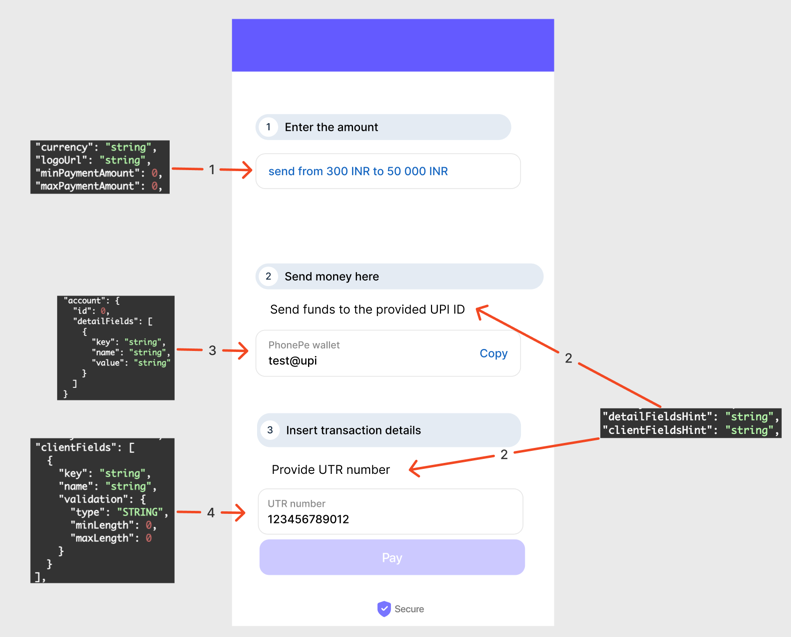
- Amount input block. The Amount field is always of type number. In the screenshot, 300 corresponds to minPaymentAmount, 50000 to maxPaymentAmount, and INR to currency.
- Hints/tooltips. detailFieldsHint relates to the top block detailFields, which contains the necessary fields with instructions on where to transfer funds. clientFieldsHint relates to the block with fields the user fills out. These hints (detailFieldsHint / clientFieldsHint) can be used as explanations or tooltips for the respective sections.
- Block with payment destination information. This block may contain multiple fields depending on the payment method. It’s recommended to add a “copy” icon to each field so the user can easily copy the field’s (value). For example, “PhonePe wallet” is the name, and “test@upi” is the value.
- Block with user input fields. This block can contain several fields, depending on the payment method. Each field has its own validation type. For example, “UTR number” is the name, while type, minLength, and maxLength specify the validation rules applied to the entered value like “123456789012”.